長尺クリップ抽出の実現への道、そしてCANTOのデザイン哲学へ。
ブラウザの限界を超えながら、触れていて楽しいプレイヤーを作り続ける。
The road to clip export — and on to CANTO's design philosophy.
Pushing past browser limits while building a player that's genuinely joyful to use.
Webの制約と格闘しながら、どうしても実現したかった機能。 Wrestling with browser limits — to build the feature that had to exist.
CANTO の開発では、EQ をはじめとする機能拡張を続ける中で、特に 長尺の音源、ライブ収録などから部分クリップを作成できる機能をどうしても実現したいと考えていました。 Throughout CANTO's development — expanding features like EQ and beyond — there was one capability I was absolutely determined to achieve: the ability to extract partial clips from long recordings and live sessions.
これは iTunes に対抗したかったわけではなく、会議メモや実務用途として本当に必要だと確信していたからです。長時間録音から必要箇所だけを切り出す。その機能の有無が、ツールとしての価値を決定づける。 This wasn't about competing with iTunes. I was simply convinced it was genuinely necessary for meeting notes and practical real-world use. The ability to extract only the needed segment from a long recording — that single feature defines the tool's value.
しかし、この機能の実装には想像以上に時間がかかりました。CANTO を Web ベースのアプリとして成立させるという前提を守ったことで、ブラウザが持つ制限を避けて通れなかったためです。
However, implementing this feature took far longer than expected. By committing to the principle that CANTO must work as a web-based app, we could not sidestep the constraints imposed by the browser.
WebAudio API と OfflineAudioContext を組み合わせることで、ブラウザ上でのオーディオスライシングが可能になります。ただし、ファイルサイズ・エンコード形式・メモリ上限という三重の壁が立ちはだかりました。
Combining WebAudio API with OfflineAudioContext makes audio slicing possible in the browser. However, three walls stood in the way: file size limits, encoding format constraints, and memory ceilings.
曲名の変更などは CANTO 内部のデータベース(IndexedDB)に保存されますが、オリジナルのファイル名そのものは書き換えないという設計も、Web アプリとしての制約と安全性を両立するための判断です。 Track name changes and other edits are saved to CANTO's internal database (IndexedDB), but the original filename itself is never rewritten — a deliberate design decision to balance web app constraints with safety.
「できること」と「できないこと」の境界を丁寧に扱いながら、CANTO の個性と価値を損なわない形を探り続ける。Carefully navigating the boundary between what's possible and what's not — always searching for a form that preserves CANTO's character and value.
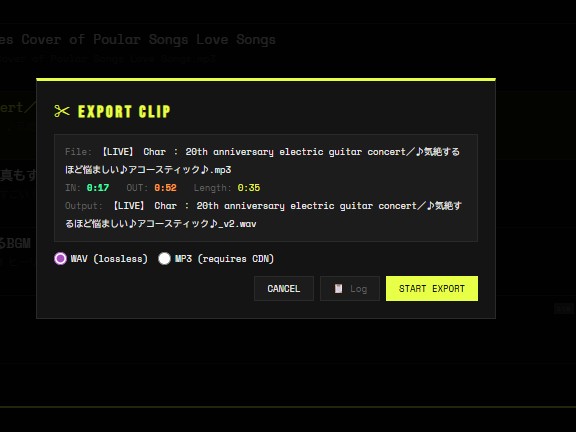
こうした積み重ねの末に、現在のバージョンにたどり着きました。エクスポートは WAV(ロスレス)とMP3(CDN 経由)の2形式に対応し、IN/OUT 点を自由に指定してクリップを書き出せます。
Through this accumulation of effort, we arrived at the current version. Export supports two formats — WAV (lossless) and MP3 (via CDN) — with freely configurable IN/OUT points.
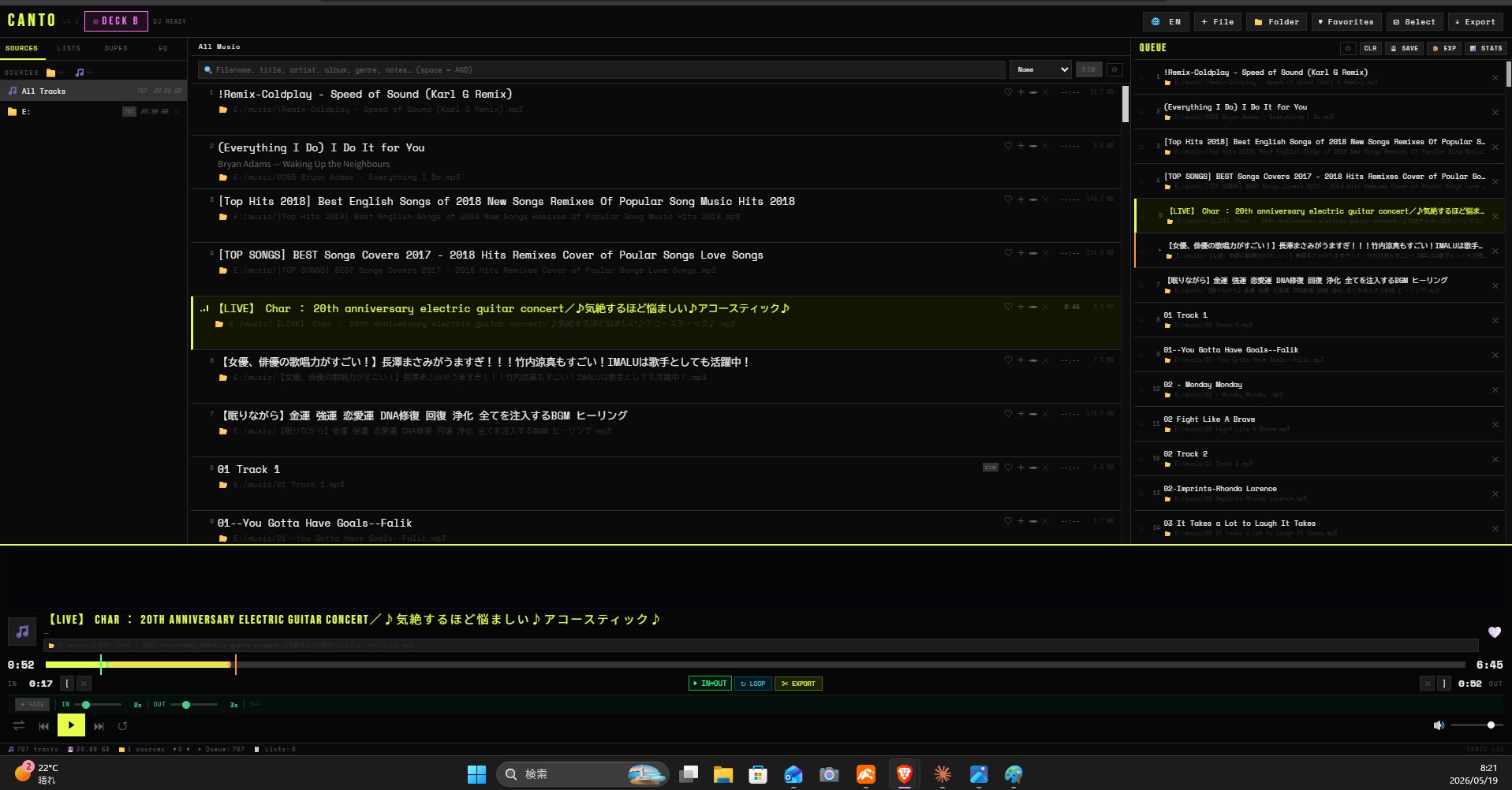
IN/OUT マーカーを波形上にドラッグするだけで、クリップの開始・終了点を直感的に指定できます。ライブ録音から会議音声まで、あらゆる長尺ソースに対応。出力ファイル名は自動的に _v2 サフィックスで生成されます。
Simply drag the IN/OUT markers on the waveform to intuitively set the clip start and end points. Works with any long-form source — live recordings, meetings, and more. The output filename is automatically generated with a _v2 suffix.
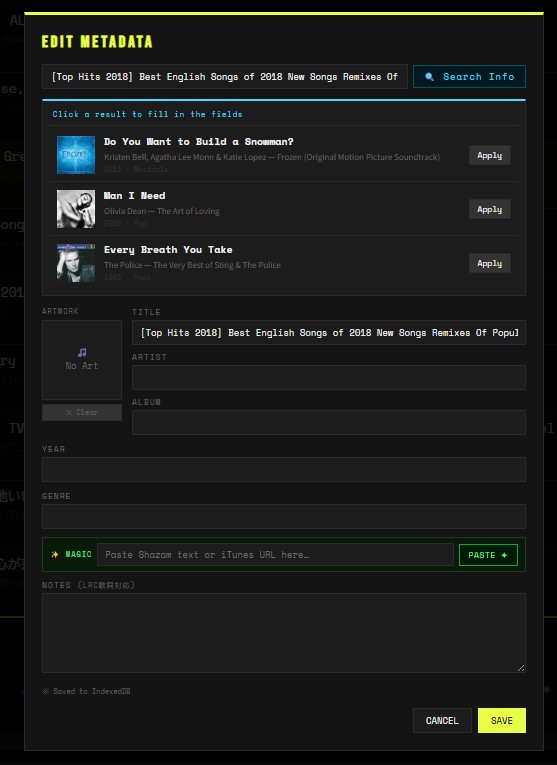
メタデータ編集・iTunes Search・EQアナライザー・プレイリスト管理——なぜCANTOは機能するだけでなく、楽しむために作られているのか。 Metadata editing, iTunes Search, EQ Analyzer, playlist management — why CANTO is built to delight, not just function.
CANTO には、プレイリストの JSON エクスポート、メタデータ編集、そしてアートワーク取り込みのための iTunes サーチ対応といった、独自性の高い機能があります。 CANTO features a set of distinctly original capabilities: JSON playlist export, metadata editing, and iTunes Search support for artwork import.
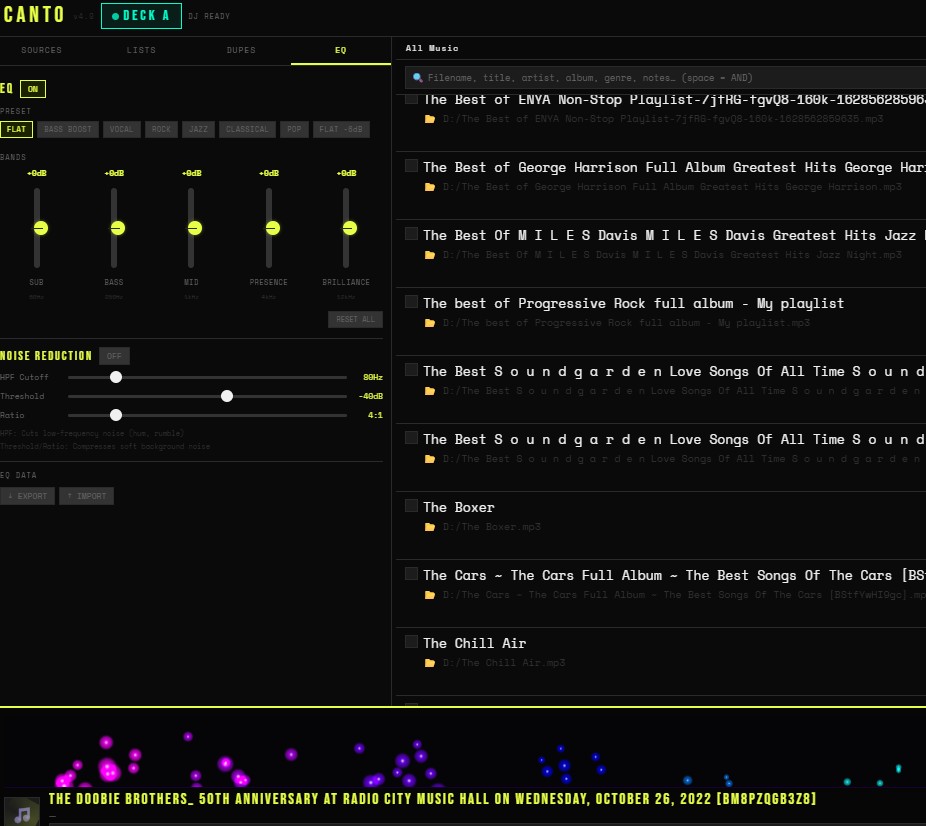
CANTO は単に音楽を再生するだけのツールではありません。アートワークを GUI デザインの一部として取り込み、EQ のアナライザーも"見て楽しめる要素"として活用する。この発想が CANTO の体験を形づくっています。 CANTO is far more than a tool that simply plays music. Artwork is absorbed as part of the GUI design itself, and the EQ analyzer is designed to be a visual element you can genuinely enjoy watching. This thinking shapes the entire CANTO experience.
私は、CANTO を「日常的に使うものだからこそ、触れていて楽しい存在にしたい」と考えています。そして同時に、ブラウザベースのアプリであることの強みを最大限に活かしたい。 My belief is that precisely because CANTO is something you use every day, it should be genuinely enjoyable to interact with. And at the same time, I want to make the most of every advantage that comes from being a browser-based app.
日常的に使うからこそ、触れていて楽しい存在でなければならない。Precisely because you use it every day — it must be joyful to touch.
こうした思想の積み重ねが、CANTO を現在の姿へと導いてくれました。メタデータ編集画面では、Shazam テキストや iTunes URL を貼り付けるだけで自動的にアーティスト・アルバム・アートワークが補完される MAGIC機能を搭載。
This accumulation of ideas led CANTO to its current form. In the metadata editor, simply pasting a Shazam result or iTunes URL automatically fills in the artist, album, and artwork — that's the MAGIC feature.
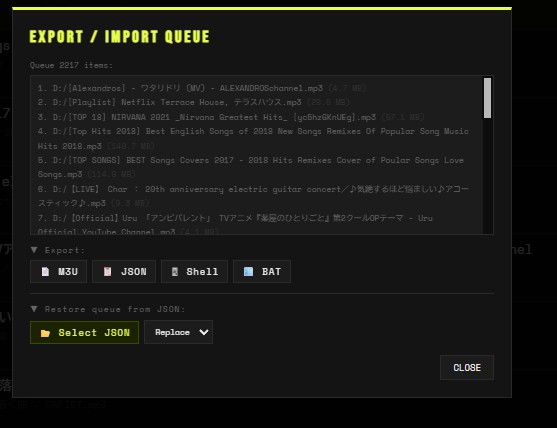
メタデータは IndexedDB に保存され、オリジナルファイルには一切書き込まれません。プレイリストは M3U / JSON / Shell / BAT の 4 形式でエクスポート可能。Play Stats も JSON で外部保存・復元できます。
Metadata is stored in IndexedDB — original files are never modified. Playlists export in M3U / JSON / Shell / BAT formats. Play Stats are also exportable as JSON and fully restorable.
EQ はスライダーを動かすだけのツールではありません。周波数スペクトルをカラフルなパーティクルとして可視化し、低域は紫・マゼンタ、高域はシアン・グリーンへと変化するグラデーションで、インタラクティブなビジュアルアートとしてデザインに融合しています。 EQ is not just a tool for moving sliders. The frequency spectrum is visualised as colourful particles — a gradient shifting from purple and magenta in the lows to cyan and green in the highs — integrated into the design as interactive visual art.
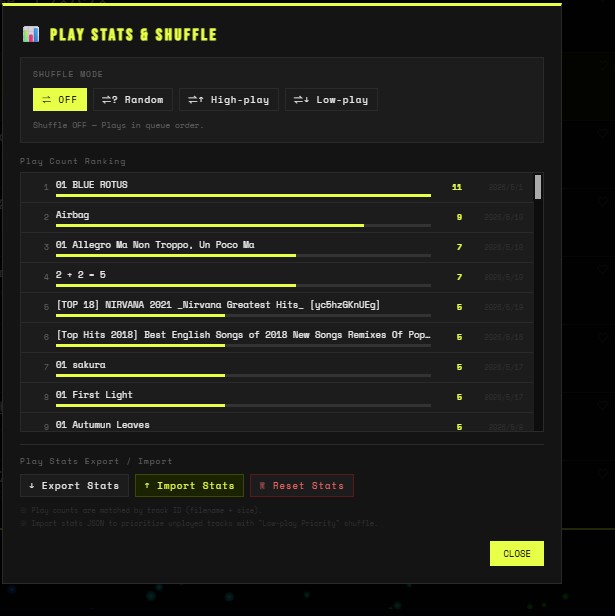
再生回数・最終再生日・シャッフル履歴を JSON で書き出し、どの機材からでも読み込める。ブラウザで動くからこそ、1台に縛られない。自分の音楽体験の記録が、場所と機材をまたいで続いていく——それが CANTO の設計思想の軸です。 Play count, last-played date, and shuffle history are all exportable as JSON and importable on any device. Because CANTO runs in a browser, your listening record isn't tied to a single machine — it travels with you across devices, keeping your music experience alive wherever you are.
プレイリストを M3U / JSON / Shell / BAT の4形式で書き出せる。どの環境でも、どの機材でも、自分のキューが生きる。WEB アプリとしての CANTO は「データが動けば、楽しみも動く」という発想で設計されています。 Export your queue in M3U, JSON, Shell, or BAT format — your playlist works in any environment, on any device. CANTO as a web app is built on a simple idea: when your data moves freely, so does your enjoyment.
CANTO / CANTO DJ MASTER / ライナーノーツ WEB PAGE / WEB MAGAZINE のすべてのコーディングは、Claude 無料プランが担当しています。一行のコードも手書きせず、対話だけで開発を進めてきました。 All coding for CANTO, CANTO DJ MASTER, Liner Notes Web Page, and Web Magazine was handled by Claude on the free plan. Not a single line typed by hand — built entirely through conversation.
デザインとは、使うたびに小さな喜びを届けること。CANTO のすべての機能は、その問いへの答えとして存在しています。次回の「デザイン思想」では、アートワーク統合とインターフェース全体のビジュアル言語についてさらに深く掘り下げます。 Design is about delivering a small moment of joy every time you use it. Every feature in CANTO exists as an answer to that question. The next instalment — "Design Language" — will go deeper into artwork integration and the visual language of the entire interface.